Fancy point and click interfaces were designed to make things simple for the non-technical user. It may be a good starting point, but if you are still using a mouse to launch programs, control the browser and look for files, do yourself a favor: install software that lets you do it from the keyboard. Seriously.
I use Launchy. There are others.
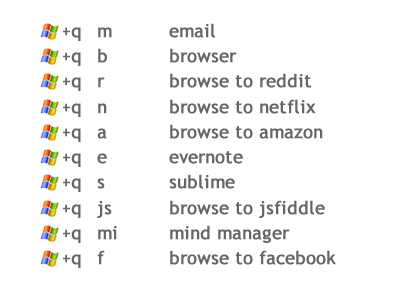
After setting up some shortcuts for what you do 90% of the time, you may find your flow changing, from piloting a little pointer all over the screen with a clicky hockey puck, to using a few (usually two) keystrokes to get just about anywhere.
Here's the workflow that covers about 80% of my daily interactions with the computer:
No searching for icons on the desktop, no looking for bookmarks, no hunting around in start manager and all programs. In less than a second I can launch any application I commonly use or browse to any sites I frequent.
This might not seem like a big deal, but if you try it for a day or so, you realize just how dorky that little hockey puck actually is.
You can also clear off icons and folders from your desktop. Maybe replace them with a zen fountain....
Showing posts with label digital. Show all posts
12.11.2012
11.18.2012
Virtual Bookshelf Project
Today's experiment. Over the years, books have taken over my home. There are shelves in the study, every bedroom, the garage, the living room, even the bathroom. If I had an attic, I'm sure books would be up there too.
For about a year I thought about replacing all the shelves with a virtual library. One I could tour on my computer or tablet, browse covers, read descriptions; the virtual shelves could be magically arranged in different configurations, by genre, subject, or just in little nooks and crannies. They could pop out on carousels, expand in size as I passed nearer, etc.
Meanwhile, the "real" books would all be in boxes in the garage. But I wouldn't have to remember where any individual book was, or rummage through the boxes to find them, because each book in my virtual library would be tagged with the box location. I'd keep a simple shelf of books I'm currently using in the study and I'd regain about a gazillion square feet in the rest of the house and improve the overall Feng Shui.
So today I began. I loaded an app on my android phone called Book Catalogue. It's public domain and was created by Evan Leybourn. Then I loaded the free zxing bar code scanner software. Since I have a piddly 2G signal at home, I also swapped out my ancient router for one with more robust support for wifi, configured the phone to use it, and headed to the garage.
I labeled a clear storage box with a snap on lid to keep the dust out as "B1" with a sharpie and started scanning books' ISBNs with the camera on my phone. It went surprisingly well. Some I had to enter the ISBN directly, a few I had to actually do a search on, but in about an hour I had 52 books scanned. All that would fit in the box. Book Catalogue pulled down the book cover, description, author, genre and a bunch of other stuff automatically for each book.
The phone app has a pretty nice interface, but I knew I'd want to customize it, so to continue exploring the proof of concept I tested the various ways data could be exported and synced. It could export to the SD card as a csv file. Pretty handy. But it also synced to goodreads.com. I setup an account there, synced it from the android and created a shelf called B1 that I could browse from the web.
I think this might just work. Goodreads is useful, and there's also a place called Library Thing that does something similar. Neither is as fancy as what I envision doing with it someday, but they are a good halfway point, allowing me to continue with the project, clear out all the books, knowing that I can probably actually find them even easier than when they were all on the shelves.Now to buy some more boxes :)
For about a year I thought about replacing all the shelves with a virtual library. One I could tour on my computer or tablet, browse covers, read descriptions; the virtual shelves could be magically arranged in different configurations, by genre, subject, or just in little nooks and crannies. They could pop out on carousels, expand in size as I passed nearer, etc.
Meanwhile, the "real" books would all be in boxes in the garage. But I wouldn't have to remember where any individual book was, or rummage through the boxes to find them, because each book in my virtual library would be tagged with the box location. I'd keep a simple shelf of books I'm currently using in the study and I'd regain about a gazillion square feet in the rest of the house and improve the overall Feng Shui.
So today I began. I loaded an app on my android phone called Book Catalogue. It's public domain and was created by Evan Leybourn. Then I loaded the free zxing bar code scanner software. Since I have a piddly 2G signal at home, I also swapped out my ancient router for one with more robust support for wifi, configured the phone to use it, and headed to the garage.
I labeled a clear storage box with a snap on lid to keep the dust out as "B1" with a sharpie and started scanning books' ISBNs with the camera on my phone. It went surprisingly well. Some I had to enter the ISBN directly, a few I had to actually do a search on, but in about an hour I had 52 books scanned. All that would fit in the box. Book Catalogue pulled down the book cover, description, author, genre and a bunch of other stuff automatically for each book.
The phone app has a pretty nice interface, but I knew I'd want to customize it, so to continue exploring the proof of concept I tested the various ways data could be exported and synced. It could export to the SD card as a csv file. Pretty handy. But it also synced to goodreads.com. I setup an account there, synced it from the android and created a shelf called B1 that I could browse from the web.
I think this might just work. Goodreads is useful, and there's also a place called Library Thing that does something similar. Neither is as fancy as what I envision doing with it someday, but they are a good halfway point, allowing me to continue with the project, clear out all the books, knowing that I can probably actually find them even easier than when they were all on the shelves.Now to buy some more boxes :)
11.13.2012
Dudley Browse-A-Lot
Whether through vocation or predilection, many of us actively research topics and interests on the internet. Some of us even try to keep track of what we discover with the crazy idea that we may actually need this again or will use it in the future. And we might, but maybe not the way we think.Case in point: Dudley Browse-A-Lot. Once a happy go lucky chap, Dudley is now worried he might be sliding down a slippery slope as the sheer number of his bookmarks starts tilting his monitor ever so slightly forward with the accumulated weight of their pixel density. At first, like most noobs, he had a short, handy list of important stuff. But soon this grew into a longer ticker tape of all kinds of stuff. Luckily he discovered he could create folders for his bookmarks. Problem solved he thought. Shortly thereafter, however, he discovered he had grown another long ticker tape list, this time of folders, each of which contained their own an equally long ticker tape of bookmarks. Like the blooming onion at Outback Steakhouse.Made of ticker tape. (I just like to say that word.)
Sadly, now whenever he clicks "bookmark" and selects a folder or sub-folder, a sinking feeling wells up in the pit of his stomach. A feeling that it's likely to be the last time he will ever see this link, so what's the point? Oh sure, he'll remember vaguely that he'd seen something about juju beans, and he'd even bookmarked it, but when confronted with the thicket of folders he wouldn't know whether it was under vegetables, funny names, story ideas or things it would be cool to can. And with hundreds of links in each folder to sort through, he was just recreating the internet, at a more personally annoying scale. After a few minutes of fruitless digging, he'd probably end up on back on google trying to find juju beans with another search. Great, another thousand links to sort through.
The context that made sense when he filed juju beans in the 'not-rhubarb' folder, may have little to do with the state of mind he's in when he's looking for it. Psychologists call this 'state specific memory', which is why sometimes when you lose your keys when you're drunk, the only way to find them again is to get drunk.
Dudley needs to step up his game before he acquires a drinking problem.
Technology is just a big dog-chasing-tail game of problems it creates and solutions it proffers to resolve them. Sometimes this actually results in forward momentum, in a Tasmanian devil sort of way.
Two tools and approaches might rescue Dudley at this stage.
Evernote
This software is basically a notebook on steroids. It comes in a free and paid version, the paid version allows you to sync notebooks to smart phones and tablets. Both versions allow you to create local notebooks on your computer. (You can always 'sync' manually by copying the Evernote folders to a usb drive.) Here are some highlights:
- Evernote has a firefox plugin to clip a section, url or entire page to your notebook. Clipping a page means even if the post or article goes away, you have a copy locally. More importantly, you can also search your entire notebook for words or phrases so it doesn't matter how you categorize it.
- But you can categorize it too, in a way that's actually more useful than a burlap bag full of stuff. Evernote uses tags. You put as many tags on an entry as you want, so instead of choosing a particular folder like "vegetables" for the juju bean article, you can tag it "vegetables", "magic beans", "cool ideas", "funny words", and use as many tags as you like. The same article could be flagged as something you want to use as a story idea, a recipe you want to try and a design for a birthday card, all at the same time.
- You can combine tags to search for stuff. You may find information you didn't even know you had, like some items in the intersections between nannies, story ideas, the Hadron Collider and things that glow in the dark. You can pull nets of information together, like todo, projects and fun.
- You can sync your notebooks with your smart phone, tablets and kindle. Which means you can make notes or take pictures on your phone downstream and these become part of your collected notes on all your devices. This is handy at the supermarket when you get the idea to make a recipe you captured online, or when you're choosing a bottle of wine mentioned by a facebook friend. You can to take a picture of something at the store, record a brief voice note of an idea to explore/research later.
- You can add voice annotations to notebook entries instead of typing commentary and add them to pictures, bookmarks or whiteboard snapshots. In fact, a note could just be a voice recording, tagged with appropriate info.
- With the advent of the Skitch add-on, you can also annotate pictures and screenshots without the messy loop of saving an image, bringing it up in a graphics program, adding text, re-saving and then putting it into Evernote. You can roundtrip the whole process directly from the note. With shared notebooks, this becomes a handy collaboration feature, even if it's just to paint mustaches on the boss.
- Through the clever use of tags, Evernote can also serve as a GTD system, to keep tasks and projects organized, a brainstorming pool, insight generator, or method to slice activities and perspectives many different ways into new gestalts of understanding.
This used to be called Read It Later. Once you've setup Evernote for the persistent stuff, Pocket can act as a helpful agent for stuff you aren't ready to file yet, but don't have time to read right now.
- Stuff flagged for read later can be viewed in a cool, pinterest type matrix during snippets of idle time.
- The entire contents of the pages flagged can be downloaded onto a tablet or smartphone to read on the go.
- After you finish reading an article it goes into an archive, so the link is always available.
- You can use tags. But if you are using Evernote, you probably shouldn't create a whole other network of tags here.
With these two tools, Dudley can now capture everything with confidence that he can easily find whatever he saves. And now it's more than just a repository, it's a tool he can use creatively in ways unique to him.
And using Pocket with discretion, he can now seamlessly time-box intervals to catch up on things that are too fascinating to miss, but which would slide through the cracks otherwise.
Goodbye bookmarks, and good riddance.
10.15.2012
Assisted Living - Delegating the Small Stuff
The complexity of modern living can be smothering. Sometimes it feels like we spend all of our time just staying afloat ---to paddle forward requires twice the effort. Days, weeks and months go by, our dreams are clogged with laundry, dishes, meals, shopping, appointments, bills, cleaning, maintenance. It's easy to slip into reaction mode and just squeeze out little pieces of open sky from the onslaught of mundane responsibilities. But then we put things off, things slip, and our daily duties start piling up like Magoo's closet. Our mind is constantly hyper, worrying about balls that we've dropped or things we've forgotten that might blindside us.
If only we had servants and staff to handle all this trivia so we can free our minds to contemplate the important stuff, the fun stuff, instead of this urgent stuff.
Well, modern times also bring unique opportunities for freeing ourselves if we use it strategically (or burying ourselves deeper in distractions if we don't.) I've been pretty successful with the former, and here's the approach I've used for several years to keep my head as empty as possible. Instead of servants, I have something better... agents.
1. Google Calendar. Anything that has to happen a certain date, I put on the calendar and forget about it. It's synced with my email client (Thunderbird) using Lightening (a calendar add-on.) When I check my mail in the morning I can see the whole week or month of places I have to be at a certain time and date. I share it with my mate, since we only have one car, we can both make entries and know whether we'll have transportation or whether we'll need to bike, bus or walk. It's synced with my phone and if I'm particularly paranoid about missing an important engagement, I can setup alerts or sms notifications. Very low maintenance, a few seconds to enter something, a few seconds in the morning to get a snapshot.
2. Journal. Here's where I put all the stuff that needs done but doesn't involve a specific date. I have a section for projects, active and queued to capture notes, a section for 'this week' and one for 'today.' After reading the mail and checking the calendar, I start with a blank slate for the day, I check the day before, to see if I want to carry anything forward, or refile it in projects and just write the stuff I actually plan to accomplish today. At the end of the week I review my active projects and any backlog and plan for the week to come. The Journal makes sure that, even if I don't do much any given day, I haven't lost sight of anything important. It's also a place I post to myself about whatever I'm thinking, much more productive than doing the same on social media or blogs.
3. Mind map. I do this once a quarter, it's basically a big map of what I want to do, explore, accomplish from a big picture perspective. It may tag projects from my journal but it's a holistic, 10000 foot view of all areas of my life, from fitness, to learning, enrichment, etc. Whenever I want to get my bearings, I look at the map.
4. Anki. I learn a lot of stuff everyday. Most of it I forget. The stuff I actually want to remember I just slap into Anki as an index card. Anki optimizes the review of information, with the minimum fuss possible, to retain a memory. It's designed so I spend the least amount of time reviewing in order to ensure I remember what I want. Anki takes only a few minutes a day and only reviews the stuff it knows you are about to forget.
5. Whiteboard for shopping. As I run out of stuff or think of things I'd like to eat, or stuff I have to pickup, I jot it down on a whiteboard with headings for places like Costco, Target, Supermarket, etc. When I'm ready to make a shopping run, I take a snapshot of the board with my phone and I've got my shopping list.
These 5 little assistants require very little ongoing maintenance, they are all basically just a place I can put something once, get it out of my head, and then go about my day with the assurance that nothing is going to fall through the cracks. I don't need to be reviewing stuff with wasted brain cycles all the time worried that I'm not keeping pace with the demands of living in a complex world.
If only we had servants and staff to handle all this trivia so we can free our minds to contemplate the important stuff, the fun stuff, instead of this urgent stuff.Well, modern times also bring unique opportunities for freeing ourselves if we use it strategically (or burying ourselves deeper in distractions if we don't.) I've been pretty successful with the former, and here's the approach I've used for several years to keep my head as empty as possible. Instead of servants, I have something better... agents.
1. Google Calendar. Anything that has to happen a certain date, I put on the calendar and forget about it. It's synced with my email client (Thunderbird) using Lightening (a calendar add-on.) When I check my mail in the morning I can see the whole week or month of places I have to be at a certain time and date. I share it with my mate, since we only have one car, we can both make entries and know whether we'll have transportation or whether we'll need to bike, bus or walk. It's synced with my phone and if I'm particularly paranoid about missing an important engagement, I can setup alerts or sms notifications. Very low maintenance, a few seconds to enter something, a few seconds in the morning to get a snapshot.
2. Journal. Here's where I put all the stuff that needs done but doesn't involve a specific date. I have a section for projects, active and queued to capture notes, a section for 'this week' and one for 'today.' After reading the mail and checking the calendar, I start with a blank slate for the day, I check the day before, to see if I want to carry anything forward, or refile it in projects and just write the stuff I actually plan to accomplish today. At the end of the week I review my active projects and any backlog and plan for the week to come. The Journal makes sure that, even if I don't do much any given day, I haven't lost sight of anything important. It's also a place I post to myself about whatever I'm thinking, much more productive than doing the same on social media or blogs.
3. Mind map. I do this once a quarter, it's basically a big map of what I want to do, explore, accomplish from a big picture perspective. It may tag projects from my journal but it's a holistic, 10000 foot view of all areas of my life, from fitness, to learning, enrichment, etc. Whenever I want to get my bearings, I look at the map.
4. Anki. I learn a lot of stuff everyday. Most of it I forget. The stuff I actually want to remember I just slap into Anki as an index card. Anki optimizes the review of information, with the minimum fuss possible, to retain a memory. It's designed so I spend the least amount of time reviewing in order to ensure I remember what I want. Anki takes only a few minutes a day and only reviews the stuff it knows you are about to forget.
5. Whiteboard for shopping. As I run out of stuff or think of things I'd like to eat, or stuff I have to pickup, I jot it down on a whiteboard with headings for places like Costco, Target, Supermarket, etc. When I'm ready to make a shopping run, I take a snapshot of the board with my phone and I've got my shopping list.
These 5 little assistants require very little ongoing maintenance, they are all basically just a place I can put something once, get it out of my head, and then go about my day with the assurance that nothing is going to fall through the cracks. I don't need to be reviewing stuff with wasted brain cycles all the time worried that I'm not keeping pace with the demands of living in a complex world.
Subscribe to:
Posts (Atom)

